
Related Expert Tools
More precision tools in the same niche.
Nether Portal Calculator
The Nether Portal Calculator works out whether two Overworld portals will link to the same Nether-side exit, using the game's real 8:1 coordinate scale and 16-block portal search radius rather than a plain distance guess. It shows each portal's computed Nether coordinates and how far apart they'd need to be to guarantee separate exits. Use it before building a Nether highway instead of finding out two hubs accidentally share a portal.
Minecraft End Portal Finder
The Minecraft End Portal Finder triangulates a stronghold's coordinates from two Eye of Ender throws, using each throw's location and F3 facing angle to work out exactly where the two lines cross. It also converts the result to Nether coordinates so you can travel there roughly eight times faster. Use it instead of blind digging or wasting extra eyes on a third and fourth throw.
Pyramid Block Calculator
The Pyramid Block Calculator works out exactly how many blocks a stepped Minecraft pyramid needs, in either hollow or solid fill, from a single base side length. It shows the height in layers, whether that base size ends in a true apex point or a flat platform, and how much more a solid version costs versus hollow. Use it before committing to a build instead of running out of materials halfway up.
Minecraft Circle Generator Logic
Why Circles Are Hard to Build in Minecraft
Minecraft's entire world is made of 1x1x1 cube blocks arranged on a strict square grid, which has no native way to represent a true curve. According to the Minecraft Wiki, builders have long relied on external circle generators to work out which blocks approximate a circle's curve, since eyeballing it by hand almost always produces a lumpy, asymmetrical result.
This calculator solves that by calculating the exact block placement for any diameter and rendering it as a visual grid you can follow directly in-game, row by row.
The Algorithm Behind a Pixel-Perfect Circle
The calculation checks every block's straight-line distance from the circle's center point and includes it if that distance falls within the radius, a rasterization technique closely related to the midpoint circle algorithm used across computer graphics wherever a curve needs to be drawn on a pixel grid. The result is a shape that stays symmetrical in every direction, not just approximately round in a few spots.
Outline vs. Filled: Which Mode to Use
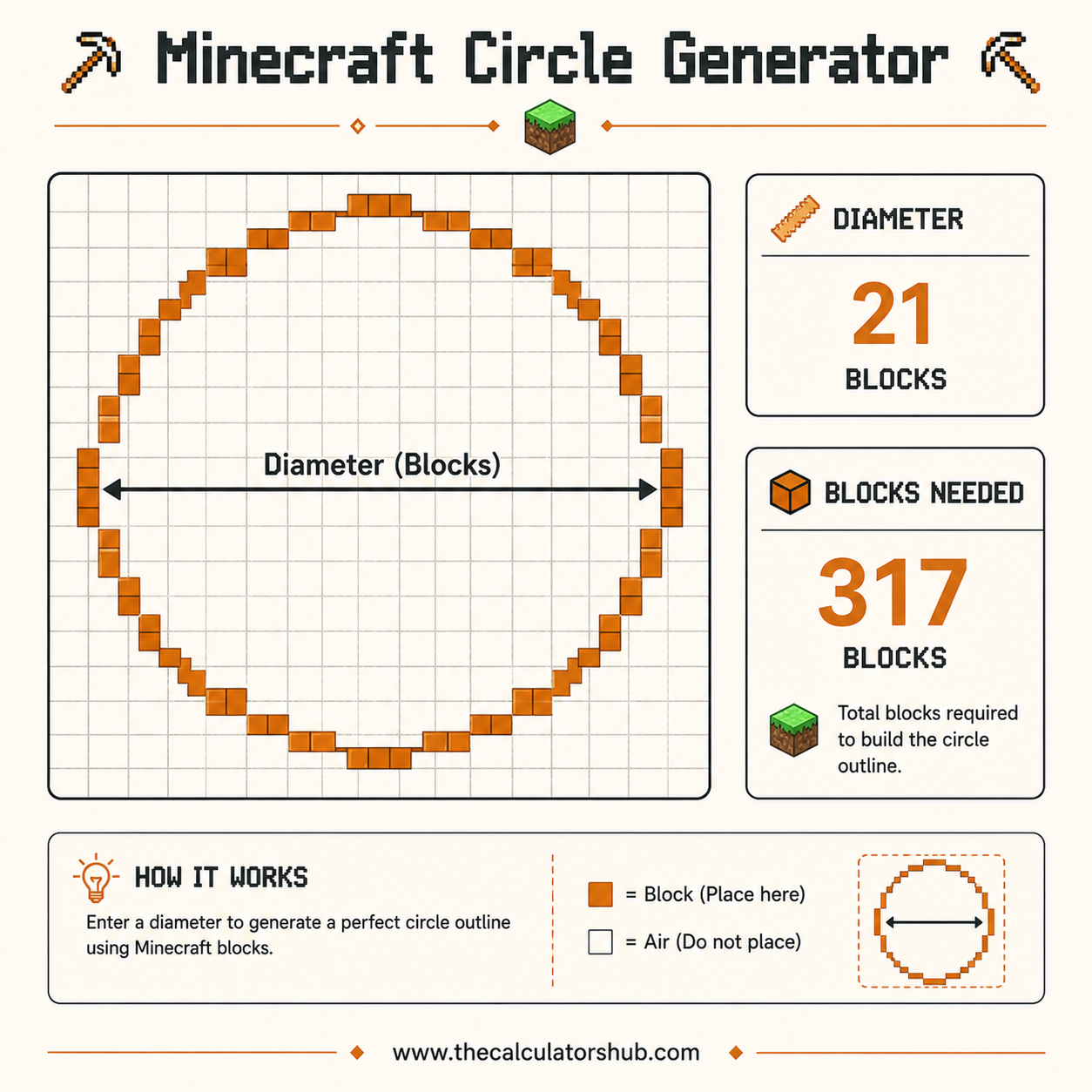
Outline mode keeps only the perimeter ring of blocks, the shape you want for a tower's outer wall, a well, a fountain rim, or a circular pathway, since the interior stays open or gets filled with something else entirely. Filled mode includes every block inside the perimeter as well, which is what solid floors, ceilings, and the stacked cross-sections of a dome need.
The block-count difference between the two is significant, a 21-block outline uses roughly 60 blocks, while the same 21-block diameter filled needs well over 300, since filled counts scale with area rather than perimeter alone. Precise math on a grid comes up outside building too, our Encounter Calculator 5e applies similar careful number-crunching to balancing a tabletop encounter.
Why Odd and Even Diameters Look Different
An odd diameter, 15, 21, or 31 for example, always centers on a single block, which makes it straightforward to line up a beacon, a torch, or a roof peak exactly in the middle. An even diameter instead centers on a 2x2 block area rather than one point, which suits double doors and symmetrical entryways but makes single-point alignment harder.
From Circle to Sphere: Building in 3D
A sphere is just a stack of circles at varying diameters, largest at the equator and progressively smaller moving up and down, mirroring how a real sphere's horizontal cross-sections shrink toward its poles. Most builders generate several circle charts at different diameters, largest in the middle layer, and stack them vertically to build the full sphere or dome.
Real-World Building Examples
According to the Minecraft Wiki's construction tutorial, circular elements add real visual depth to statues, pixel art, fountains, and towers compared to purely rectangular builds. A common use case pairs a wide filled circle as a tower's base floor with a matching outline circle several blocks up for the tower's outer wall, giving the structure a properly rounded silhouette from any angle.
Working out a different kind of in-game math while you build, like tracking kill-death ratios in competitive matches, is what our KD Calculator handles for players who split time between building and PvP.
Accuracy and Limitations
The block placement this calculator generates is mathematically exact for the given diameter, there's no rounding ambiguity in which blocks fall inside the radius. What it doesn't decide for you is the third dimension, turning a flat circle into a tower wall, a dome, or a sphere still requires stacking multiple diameters in the right sequence, which is a design choice rather than something a single circle chart can dictate on its own.
Very large diameters also become impractical to place by hand regardless of how accurate the chart is, past a certain size most builders switch to in-game building tools like WorldEdit rather than placing every block manually from a chart.
The Most Common Circle-Sizing Mistake
The error I run into most often with builders isn't the algorithm, it's mixing up radius and diameter when they type the number in, which turns out a circle exactly half or double the size they actually wanted. That mistake gets expensive fast: a filled 41-block circle needs close to 1,300 blocks, so gathering materials for the wrong size means a wasted trip back to the chest room. With that in mind, I'd always double-check whether the field wants the full width across or just the distance from center before placing a single block. Past roughly a 40-block diameter, it's also worth switching to a building tool like WorldEdit's docs rather than placing every block by hand, since that's where most placement errors creep in.
Frequently Asked Questions

Muhammad Shahbaz Siddiqui
Founder, TheCalculatorsHub
How getting the diameter right saved me from redoing an entire tower base
Halfway through building a wizard tower on a survival server, I'd already placed roughly 40 blocks of a circular base by eye, judging the curve as I went, when a friend pointed out one side looked noticeably flatter than the other. Comparing it against a generated 21-block diameter circle confirmed it, I'd drifted off the true curve by 2 blocks on one side without ever noticing while placing them.
Rather than trying to patch just the lopsided section, I tore the whole ring out and rebuilt it block by block against the generated grid, an outline pattern for a 21-block diameter using exactly 60 blocks. According to the Minecraft Wiki, freehand circles are one of the most common sources of visibly lopsided builds precisely because small placement errors compound as you work your way around the ring, which is exactly what had happened to mine.
The rebuilt base came out perfectly symmetrical from every angle, and I've generated a chart before starting every circular structure since, rather than trusting my eye partway through a build and hoping it stays consistent.